Mobile, tablet and touchscreen support
Use GSKPOS in a mobile browser, or switch the sales workspace to a product-tile interface for touch entry.
How it works & availabilityRecord sales, manage stock, follow up customer payments, and understand your profits, all in one system, with online selling built in when you need it.
7 days free No card required
After your trial, plans start at UGX 500,000/first year.
Compare plans & renewal prices
Here to shop? Browse local businesses
Actual GSKPOS screens and a receipt generated by the system, shown with demonstration data. Open any image for a closer look.
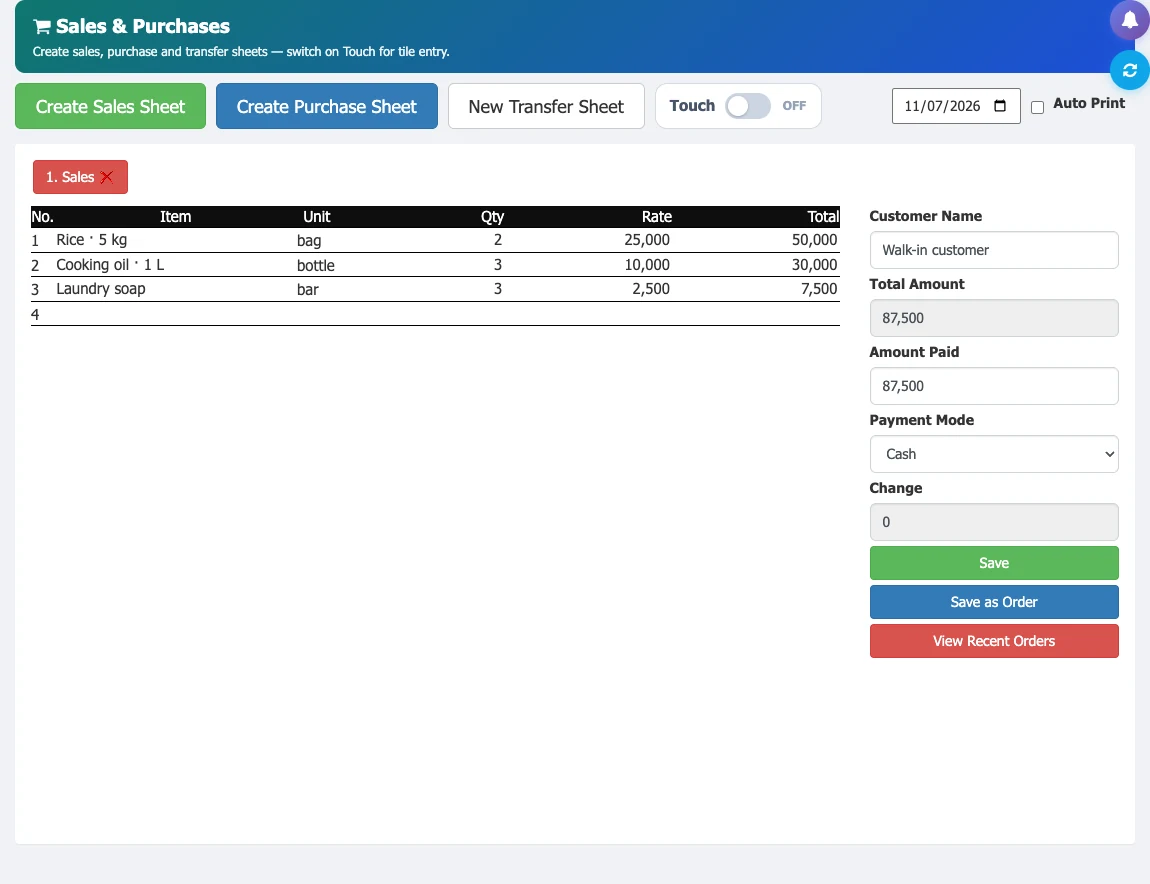
Enter items and measurements, review the total, then choose how the customer pays.
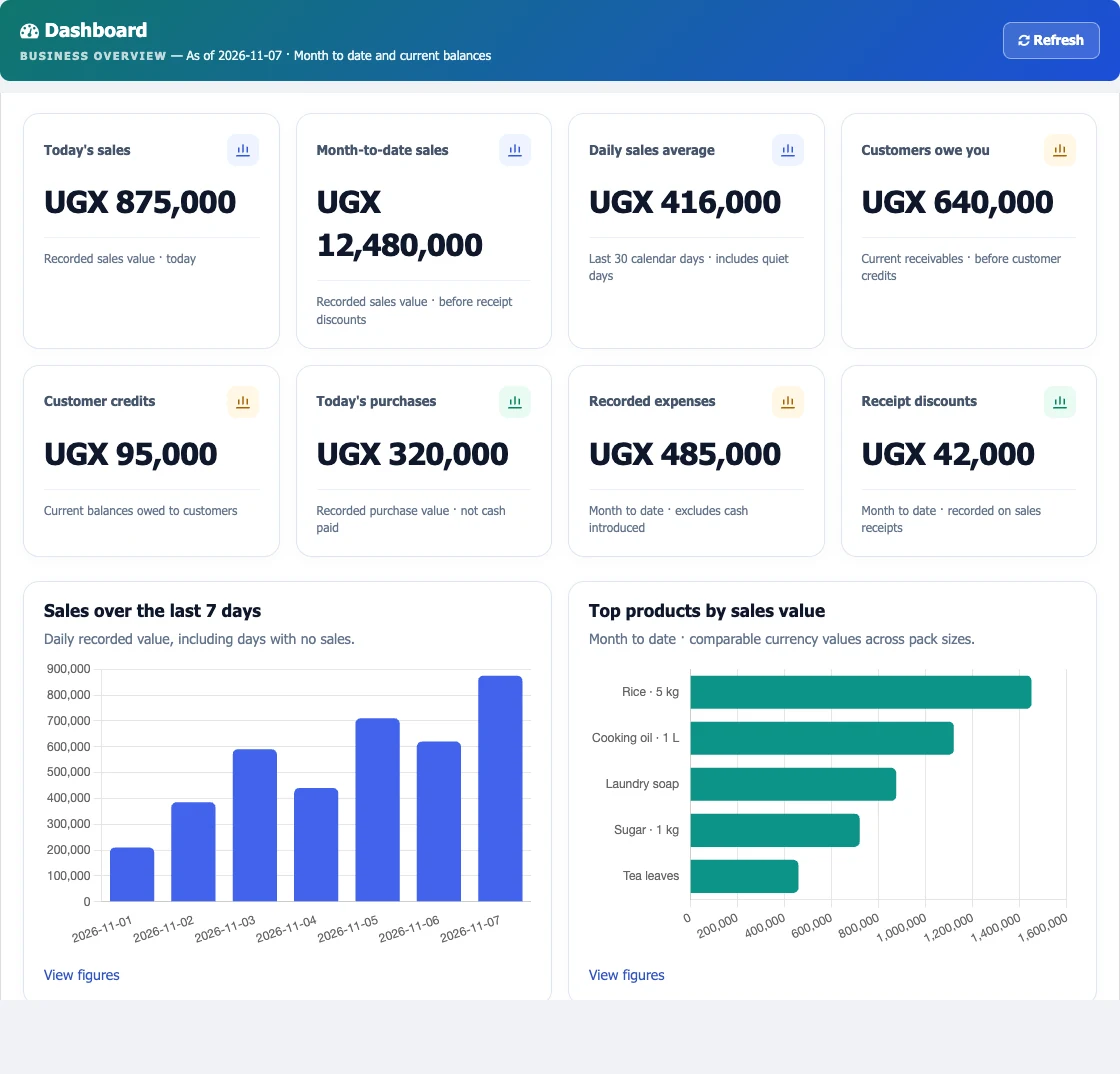
Review recorded sales, purchases and customer balances, with charts that make patterns easier to spot.
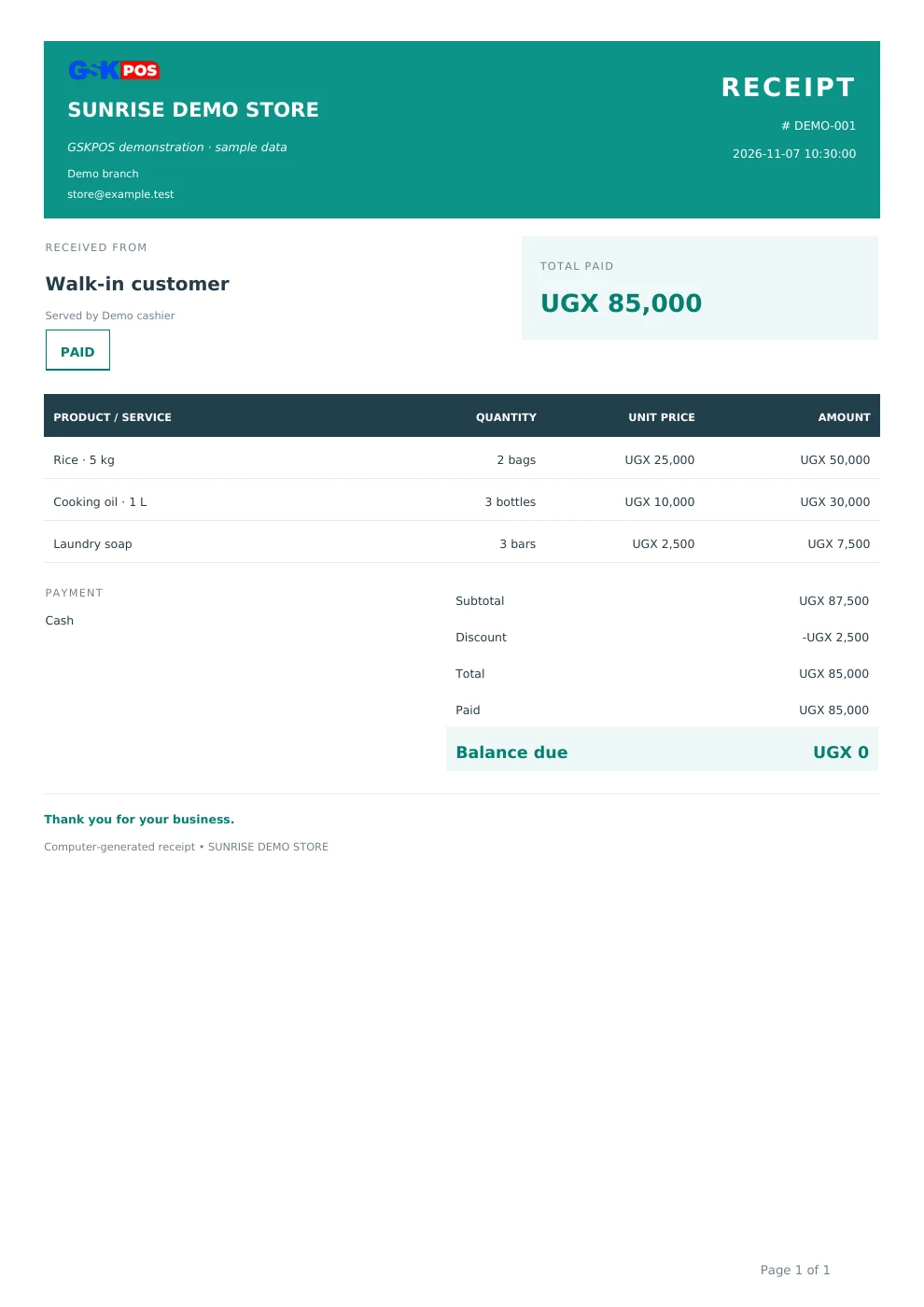
Download a clear, branded sales document with itemised totals and payment status.
Sample figures illustrate the interface, not customer results. This receipt is not an EFRIS fiscal invoice. Features depend on your package and setup.
Replace scattered books and disconnected records with a clearer way to run your business.
“What did we sell today?”
Keep cash and credit sales, items and receipts together. Look back at a transaction without searching through notebooks.
“What needs restocking?”
Track stock levels, different measurement units, purchases and transfers. See what is running low before planning your next order.
“Who still owes us money?”
Follow customer credit, payments and outstanding balances. Use account statements to make follow-ups more informed.
“What came in, and what do we owe?”
Record stock received, buying costs and supplier payments. Keep your purchase history and supplier balances within reach.
“Are sales turning into profit?”
Review sales, product costs and recorded expenses. Use business reports to see beyond turnover and make better-informed decisions.
“Who can do what?”
Set staff roles and permissions for the work they need to do. Review recorded user activity for better accountability.
“Are our receipts URA-accepted?”
Connect your sales to Uganda’s EFRIS, with fiscal document numbers, verification codes and QR codes on accepted invoices. Available on Premium after EFRIS setup and activation.
“What if the internet drops?”
Prepare your device online, then record sales during a connection interruption. Pending sales sync when you reconnect; EFRIS acceptance still requires a connection to URA.
Ask better questions, keep people informed and spot the work that needs attention. Availability depends on your plan, permissions and setup.
Use GSKPOS in a mobile browser, or switch the sales workspace to a product-tile interface for touch entry.
How it works & availabilityAsk questions about your business records and get help with everyday GSKPOS workflows.
How it works & availabilityKeep customers and suppliers informed about supported sales, deposits and payment events.
How it works & availabilityReview a completed day through scheduled email summaries with a downloadable PDF report.
How it works & availabilitySet per-unit selling rates for quantity bands and maintain prices for different measurements.
How it works & availabilitySee evidence-based prompts about stock, cash check-ins and unpaid customer accounts.
How it works & availabilitySpot purchase-price changes and sales at or below a known FIFO cost before saving.
How it works & availabilityStart with your business records. Build a connected way of working as you go.
Watch the getting-started tutorial to see the workflow in action. Watch on YouTube
Add products, prices and opening stock. Set up customers, suppliers and the people who will use the system.
Sell, issue receipts and record stock coming in. Your transaction history stays connected to your inventory.
Record customer collections, supplier payments and business expenses. Keep track of what was paid and what remains outstanding.
Open your dashboard and reports to review sales, stock and profits. Decide what to replenish, which balances to follow up and where to focus.
When you are ready to reach customers online, make your business discoverable and let people browse your products. Manage incoming online orders alongside your everyday operations.
Already using GSKPOS? Start with the shop checklist. Listing is optional; order-management features depend on your package.
Explore the customer side of GSKPOS and see how local businesses present their products.
Public listings at page load, 16 November 2026. These are marketplace listings, not total GSKPOS customers.
Browse local shopsExplore the desktop and phone dashboards, sales workspace and a system-generated receipt. All sample figures are demonstration data.
Look inside GSKPOS →Browse the businesses that have chosen to make their listings public. Listing counts describe this marketplace, not all customers using GSKPOS.
Browse public shops →Use the 7-day trial to check sales, stock and your staff workflow before choosing an annual package. Ask our team about your setup.
Try GSK POS free for 7 days →The screens use demonstration data. Public shops choose whether to be listed. Explore the trial with the products and daily tasks that matter to your business.
RetailLink connects GSK POS retailers with participating manufacturers and distributors. Bring supply requests, delivery updates and receipt acknowledgements into one shared workflow.
Retailers choose their supplier connections and authorise access to relevant product information. Suppliers can follow demand for their products and respond to replenishment requests.
Explore RetailLinkDeveloped by CODEAXIS Technologies Ltd. RetailLink is preparing for a controlled pilot; availability depends on participating suppliers and retailers.
For manufacturers, suppliers and distributors with a RetailLink account.
Start with the basics. We can help you choose a plan and check your setup.
Explore all questionsYes, on a device that has been prepared for offline sales while online. Record sales during an interruption, then reconnect to sync pending records. Initial setup and services such as EFRIS acceptance need an internet connection.
GSKPOS offers browser printing and thermal receipt options. Direct printing depends on your printer, operating system and setup. Check your model with our team before buying hardware.
Ask about your printerEFRIS invoicing is available on Premium and needs separate setup and activation. EFRIS setup and yearly renewal fees apply. Our team can explain the requirements and current charges before you proceed.
Compare package featuresThe trial lets you explore Premium features without a payment card. To continue using the system after the trial, choose and pay for a package. Your chosen package determines the features available with your subscription.
See first-year and renewal pricesYes. Public shop visibility is a separate setting. You decide when to make your shop visible; you can use sales, stock and business records without publishing an online shop. Read the shop launch checklist and guided setup instructions.
Yes. GSKPOS has responsive browser layouts for phones, tablets and computers, plus a separate Touch mode for product-tile sales entry. In Sales & Purchases, turn on Touch in the toolbar to search and tap products, adjust quantities and review checkout. The standard keyboard worksheet remains available. Touch availability, permissions and connected printer or scanner setup still apply.
View feature requirements and accessAsk about sales, stock and customer records, or ask how to use a feature. Authorised tools support selected tasks; changes require confirmation. Availability depends on your plan, permissions and AI service setup. It is an aid to decisions, not a guarantee that every answer is correct.
View feature requirements and accessYes. Supported updates include sales, deposits and payments, with reminder options. Open SMS Management to review activation and message settings. SMS is metered and requires an enabled service and sufficient balance; delivery depends on the provider and recipient network.
View feature requirements and accessYes, on eligible plans with daily report delivery configured. Use Notification Management to review recipients, timezone and schedule, then preview a completed day. Email summaries include a PDF and disclose missing data. Eligibility checks can skip inactive businesses or businesses without products.
View feature requirements and accessYes. Configure quantity ranges for a measurement, each with a per-unit selling rate. Matching quantities use that rate. The Price Editor can adjust selected measurement prices and existing range rates by percentage or fixed amount, with preview and explicit save.
View feature requirements and accessBusiness Voice provides evidence-based briefings and an attention inbox from supported business records. It is different from the conversational AI assistant: insight generation follows defined rules, while an Explain action can help you understand the saved evidence. Access requires an eligible plan, enablement and permissions.
View feature requirements and accessPrice Watch can warn about sales at or below a known FIFO lot cost and supported purchase-price changes. Alerts use recorded cost evidence, so unknown historical costs limit what can be checked. It is an advisory safeguard, not a guarantee of profitability.
View feature requirements and accessGet set up and put your everyday business records to work.
Packages from UGX 500,000 for the first year. Premium at UGX 1,000,000 includes installation, setup and training. Renewals from UGX 300,000 per year.
Sell in store now, prepare an online shop when you are ready. Read the optional shop launch checklist. Registration does not publish your shop.
Questions before you start? Read the FAQ or talk to our team.